
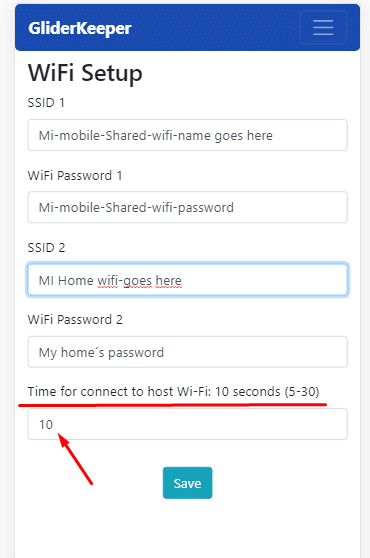
From version 1.20 onwards, you can store two Wi-Fi network names (SSID) and their passwords in this menu.
Set your phone's Wi-Fi in the first slot and your home's in the second. This makes life easier: you no longer have to change either one to match a single stored network, as in previous versions.
You can also change how long, after entering Wi-Fi mode, GliderKeeper will try to connect to those stored networks (STA mode) before becoming a Wi-Fi access point (AP) on its own.
- If you intend to use AP mode, you can set this time to around 5 seconds for faster AP creation.
- If you intend to use your host Wi-Fi networks, we recommend 15–20 seconds, depending on your LAN. The maximum is 30 seconds.
Many people have asked why they can't change the AP-mode Wi-Fi name to something like "John's GliderKeeper". The reason is that this ID and name are reserved for future versions, where results can be sent to the competition organisation and this ID will identify the correct GliderKeeper.
Note: if you set the time to just five seconds, it may fail to connect or need several attempts.